


Introducing AI-Powered Task Structuring - Now Live!
Work Smarter. Plan Faster. Collaborate Better

Most strategies die before they leave the whiteboard. Project charters get lost in email threads, Word docs, and admin overhead. And while PMOs and Ops leads spend hours defining the what-milestones and deadlines-they rarely define the how. That's where execution breaks down. Add to that the lack of PDCA discipline and progress tracking, and it's no wonder most projects stall before real impact is made.
That's why we built our new AI-powered task structuring assistant-to help teams move from intent to action in seconds. Whether you're managing complex initiatives or just trying to bring clarity to a to-do list, this feature transforms vague goals into structured, PDCA-tagged action plans. It embeds planning discipline into daily work, turning best practices into repeatable routines-so continuous improvement becomes the default, not an afterthought.
Key Benefits for Every Team
- Instant Project Structuring: Turn vague ideas into clear plans with auto-generated problem statements, tasks, and PDCA tagging.
- Save Time: Eliminate back-and-forth planning and manual formatting-go from concept to execution in seconds.
- Build Discipline Without the Drag: Reinforce PDCA thinking and accountability across your team, without needing formal training.
- Empower Everyone: From experienced PMs to new hires, the AI Assistant levels the playing field and improves output consistency.
- Smarter Meetings, Fewer Emails: Push structured plans into task boards and shared dashboards-no spreadsheets required.
IT Specifications
- Data Sent To AI - Only structured task prompts. Minimizes exposure to sensative invormation
- Open AI Data Use - Data is not used for model training and is deleted after 30 days
- Encryption - TLS 1.2+ in transit, AES-256 at rest-same as online banking. Keeps your information safe from interception
- User Prompts - Platform includes input warnings and templates to discourage PII. Helps enforce responsible usage at the source
- System Logs - Logs can be tracked within our platform upon client request. Offers traceability and usage oversight
- Client Control - AI features can be toggled off or limited to specific roles.
What's Coming Next
We're not stopping here. This is just the beginning of our AI-native transformation.
In the coming months, we'll be rolling out:
- AI-Enhanced Process Mapping - Quickly document workflows using natural language input
- Standard Work Catalog Builder - Instantly catalogue roles, recurring tasks, and SOPs
- AI-Guided Hoshin Kanri - Deploy strategy using guided X-matrix alignment tools
- Adaptive KPI Modeling - Build dynamic action plans that evolve with performance
- "What Should I Do Next?" Assistant - Prioritize tasks and next steps across your portfolio
- Client Control - AI features can be toggled off or limited to specific roles
Questions? Compliance Review? Let's Talk
If you're part of an enterprise team, we encourage your IT, Compliance, or PMO leads to schedule a discovery call. We'll walk you through:
- Data flow and integration points
- Audit trail and logging options
- User controls and permission settings
- Support for sandbox testing and staged rollout
- Book a Compliance & IT Review Call
Final Word
The best way to understand the value of Presto PDCA's AI features is to try them yourself. We built these tools to make structured planning second nature-so your team can focus on delivering, not just documenting.
P.S.
If your organization has been stuck in pilot-mode with AI, now's your chance to break through. We've built the infrastructure, the logic, and the user experience so you don't have to.
How to Get Started - Step-by-Step
1. Click here to create a new project

2. Select a kanban/workflow which contains the AI indicator

3. Access the AI PDCA framework generator
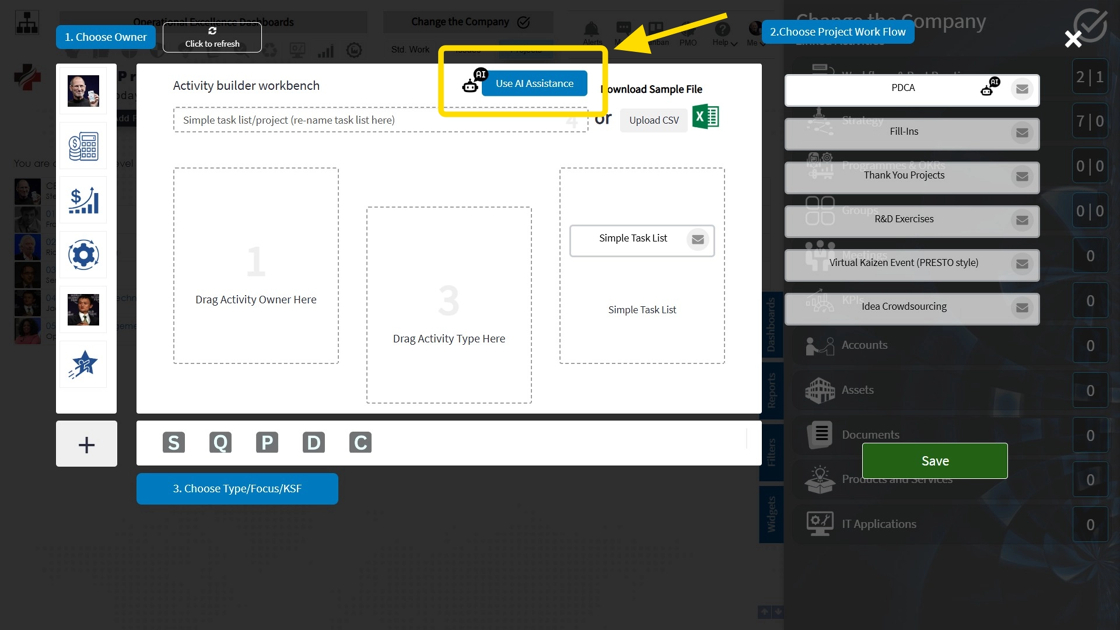
4. Explain your project or problem statement here

5. Confirm the date of delivery (finish date of the DO tasks)

6. Choose the number of desired tasks & save. (Note - select the 'Use Plan-Do-Check-Act box to allow for the AI-Assistant to automatically assign the PDCA logic to your project)

7. Save Project. AI will now do the rest!
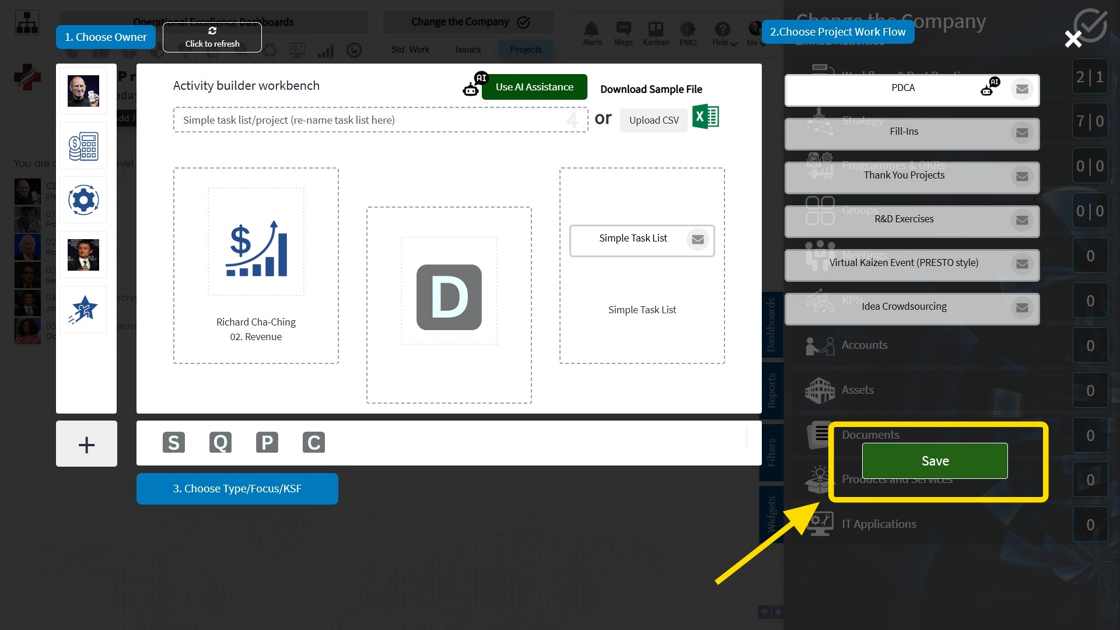
8. The AI Assistant has now created your project complete with a title, description and a set of task lists with estimated due dates. Each task has been assigned to the appropriate Plan-Do-Check-Act change phase

Part II. Using the AI-Assistant to edit a pre-existing project
In this example, we would like to review and add additional tasks to project 15295 using the AI Assistant
9. Click here to access the AI Assistant
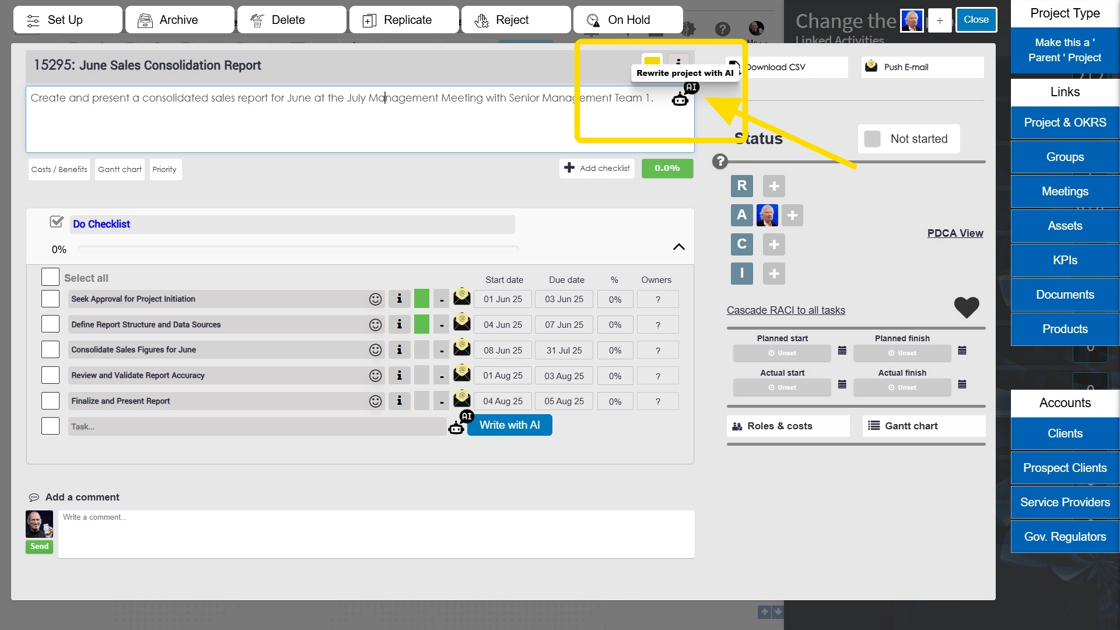
10. Revise the problem statement, due date and desired number of tasks to include
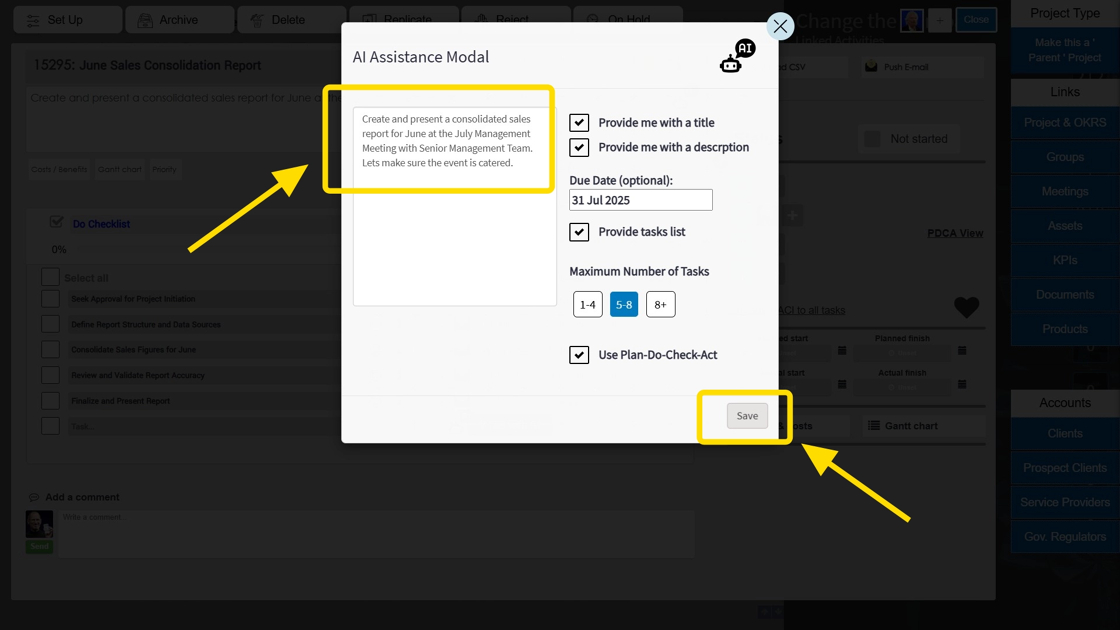
Tip: From the AI Revision Panel, you can then compare before & after versions of your project and select the appropriate modifications resulting from the enhancement
11. Compare the before/after task list. Select the version that fits best.
